

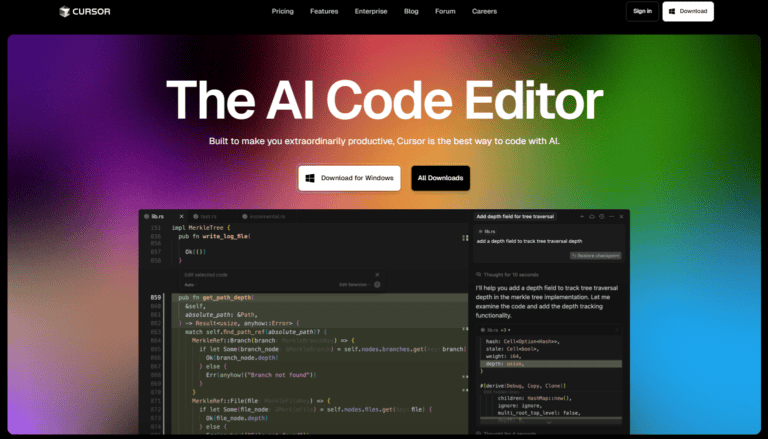
Among the most talked-about innovations in this era of AI software is Cursor AI, a development that blends human programming with AI to make coding faster, more intuitive, and more context-aware than traditional tools. In an era where AI is increasingly embedded into workflows, understanding Cursor’s capabilities, functionality, origins, and implications is essential for software engineers, technology leaders, and organisations seeking to leverage intelligent coding tools.
Cursor AI and Its Origin
In essence, Cursor AI is an AI-powered integrated development environment created by the American software company Anysphere, Inc. Unlike traditional code editors, its AI is built directly into the tool rather than added as a plugin, enabling features such as code generation, intelligent autocomplete, and multi-file editing as core functions.
Founded in 2022 in San Francisco by Michael Truell, Sualeh Asif, Aman Sanger, and Arvid Lunnemark, Anysphere has quickly grown its flagship product, Cursor, securing major funding, global clients, and significant revenue, reaching around $1 billion in recurring revenue by late 2025.
Cursor runs on Windows, macOS, and Linux, offering capabilities that extend far beyond standard IDEs, providing developers with a fully integrated AI-enhanced coding experience.
How Cursor AI Works
To understand Cursor AI, it helps to start with what makes it different from other programming tools.
Native AI Integration
While many code editors rely on third-party plugins to access AI features, Cursor embeds AI deeply within its architecture. This means the AI component is not something bolted on, but a core part of how the editor functions. It draws on large language models to interpret instructions, analyse existing code, and generate new code based on human prompts.
Natural Language Coding
One of Cursor’s standout capabilities is its ability to take natural language instructions and transform them into working code. Developers can type something akin to a plain-English requirement, such as “add authentication middleware for this API endpoint,-and Cursor’s AI can generate, update, or refactor code to match that instruction.
Codebase Awareness
Many AI tools operate in isolation, generating code snippets without a full understanding of a project’s structure. Cursor, by contrast, indexes and understands the entire codebase. This gives its AI context and allows it to suggest edits that align with project conventions and dependencies, not just the current file.
Smart Rewrite and Autonomous Agents
Beyond simple suggestions, Cursor can perform large-scale refactoring across multiple files, execute background coding tasks, and run autonomous “agents” that carry out complex programming assignments. These agents can navigate repositories, fix bugs, and generate new features with minimal human intervention.
Model Flexibility
Cursor supports integrations with multiple AI models, enabling practitioners to choose between different providers and performance profiles. Through such flexibility, developers have access to state-of-the-art language models from a range of sources to suit diverse coding needs.
Core in Depth Features
Cursor’s design emphasises productivity, accuracy, and developer experience. Its key features include:
Intelligent Autocomplete: Extends beyond simple code completion to multi-line predictions informed by entire codebases.
Natural Language Editing: Users describe what they want to accomplish, and the Cursor generates or modifies code accordingly.
Codebase Query and Chat: Developers can ask questions about their project, such as how a module works, and receive guided answers contextualised to the specific code.
Autonomous Coding Agents: These agents can independently handle complex tasks, such as implementing features or refactoring modules across files.
Debugging Support: Tools help identify and fix errors in AI-generated or human-written code, improving quality assurance.
Extensibility and Familiar Interface: Cursor remains compatible with themes, extensions, and workflows familiar to Visual Studio Code users, reducing the learning curve.
Practical Use Cases
Cursor’s capabilities make it suitable for a variety of development scenarios, including:
Rapid Prototyping and Feature Development: By generating boilerplate or complex code from prompts, teams can accelerate delivery timelines.
Codebase Maintenance and Refactoring: Cursor’s understanding of project context enables large-scale updates that would otherwise take developers many hours to complete.
Learning and Onboarding: Junior developers can benefit from natural language explanations and examples that bridge understanding gaps.
Collaborative Development: With AI agents running tasks and summarising changes, collaboration between distributed teams becomes more seamless.
Tool Integration: Cursor can plug into communication platforms and browser environments to support asynchronous workflows.
CursorAI and Its Rivals
The AI coding landscape includes several competing tools, such as IDE extensions like GitHub Copilot or independent services like Replit AI. Cursor’s defining differentiators include:
Native vs Plugin AI: Unlike Copilot, which works as an extension layered on top of an existing editor, Cursor’s AI is native to the environment, giving it deeper influence over the editing process.
Full Codebase Awareness: Many rivals lack the ability to analyse entire projects and make informed multi-file edits that respect project conventions. Cursor’s indexing provides this capability.
Autonomous Agents: The ability to deploy AI agents capable of executing complex coding tasks independently is uncommon in many competing environments.
Flexibility of Model Choice: Cursor’s support for a range of AI models, rather than locking users into a single provider, gives developers options to balance cost, performance, and preferences.
AI Coding Tools
For meaningful progress in AI-assisted development, three priorities stand out:
Improved model reliability: Reducing hallucinations and incorrect outputs.
Educational integration: Embedding tools like Cursor into learning pathways to upskill developers.
Broad access: Ensuring cost and infrastructure do not limit participation in AI-augmented coding.
Progress in these areas can make advanced development tools more widely accessible, enabling more people to create high-quality software and elevating global coding standards.
Steering Forward
AI-powered development tools like Cursor are transforming software creation by acting as collaborative partners rather than replacements for human programmers. They boost productivity, simplify complex tasks, and are set to reshape coding workflows and professional expectations as AI technology continues to advance.

Senior Reporter/Editor
Bio: Ugochukwu is a freelance journalist and Editor at AIbase.ng, with a strong professional focus on investigative reporting. He holds a degree in Mass Communication and brings extensive experience in news gathering, reporting, and editorial writing. With over a decade of active engagement across diverse news outlets, he contributes in-depth analytical, practical, and expository articles exploring artificial intelligence and its real-world impact. His seasoned newsroom experience and well-established information networks provide AIbase.ng with credible, timely, and high-quality coverage of emerging AI developments.